Physical Address
304 North Cardinal St.
Dorchester Center, MA 02124
Physical Address
304 North Cardinal St.
Dorchester Center, MA 02124

Through Diversity and Inclusion
Through Diversity and Inclusion
Add
Alt text for the images
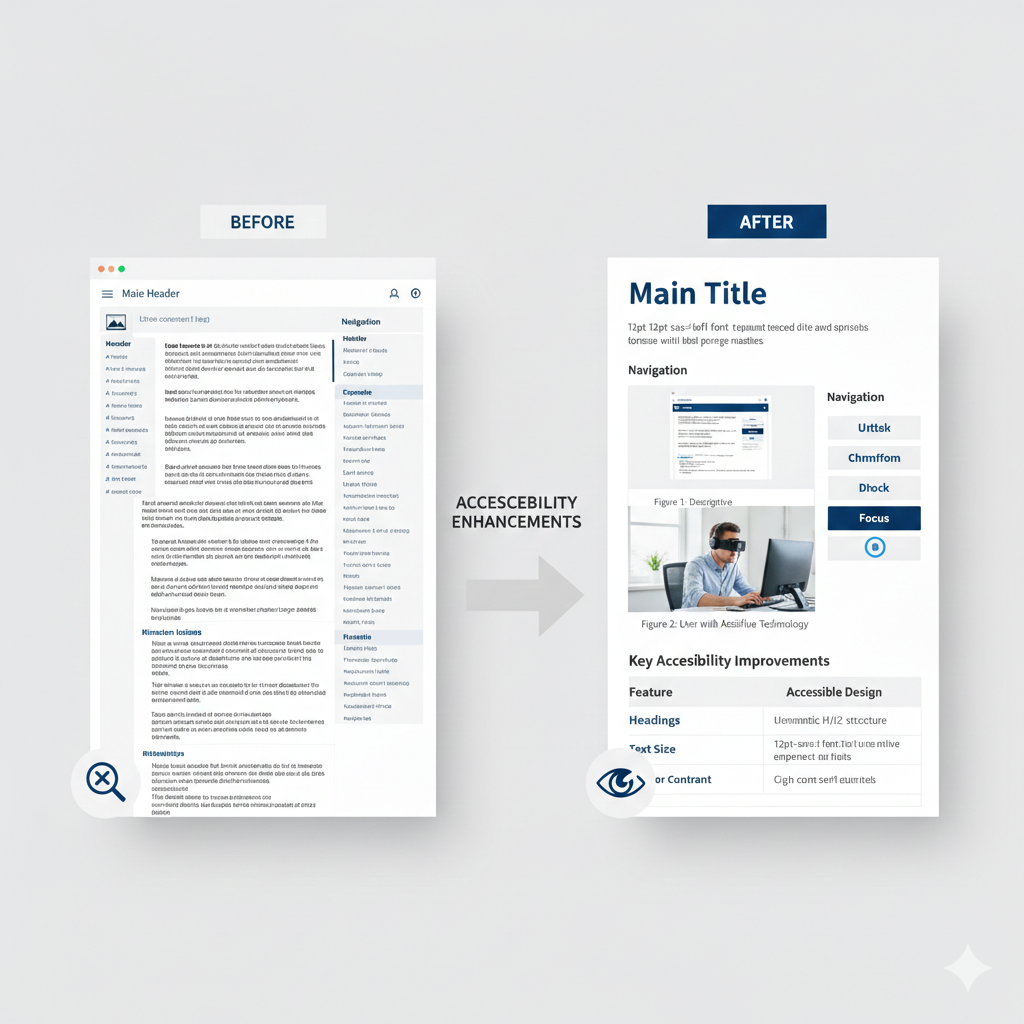
Accessibility in online learning is more than a technical requirement—it is a commitment to equity, inclusion, and meaningful learning for all students. As digital content becomes central to instruction, educators must design materials that intentionally remove barriers. This reflective blog post documents my experience revising a simulated learning object titled Orchards and Vineyards to enhance accessibility and align with ADA and digital accessibility standards.
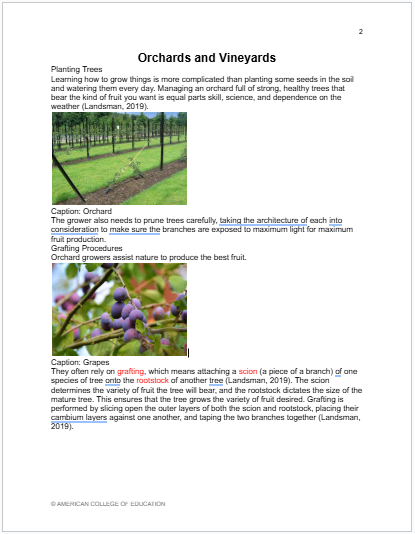
The original learning object contained multiple accessibility barriers that limited equitable access, particularly for learners who rely on assistive technologies or who experience visual or cognitive challenges. Using Track Changes, comments, formatting updates, highlighting, and an accessibility checker, I identified nine accessibility issues. This process emphasized the importance of embedding accessibility into instructional design rather than addressing it retroactively.
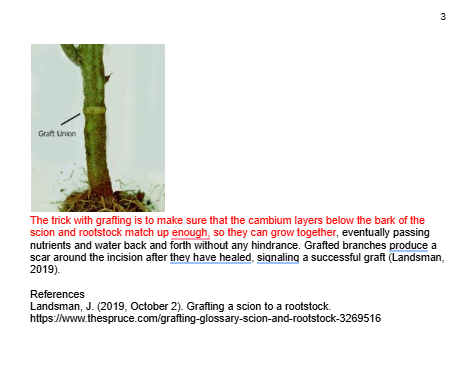
One major issue involved the improper use of the main title. The title was not clearly distinguished from the body text, making navigation difficult for screen reader users. The title was reformatted as a proper main title, increased in font size, centralized, and assigned a high-contrast color to establish a clear visual hierarchy (King & Piotrowski, 2021; WebAIM, 2021).
Additionally, headings throughout the document were inconsistently formatted and not identified using heading styles. All section headings were revised using a consistent Heading 1 format and centralized to support logical structure and efficient navigation for assistive technologies (Huss, 2022; WebAIM, 2021).
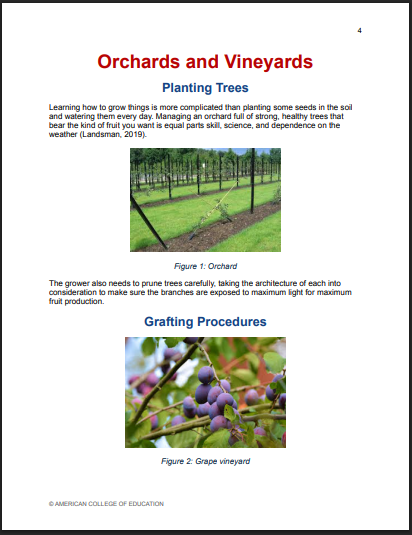
The document also presented readability challenges due to inconsistent font styles, text sizes, and paragraph spacing. These issues increased cognitive load and reduced overall clarity. To address this, the document was standardized to a single font, body text was set to 12-point, and consistent paragraph spacing was ensured (WebAIM, 2021). These revisions improved content flow and supported learners who benefit from predictable layouts (Koob et al., 2022; WebAIM, 2021)
Image placement and alignment were also revised. Misaligned images and captions created visual inconsistency and confusion. Centralizing images with consistent captions resulted in a cleaner, more accessible layout.
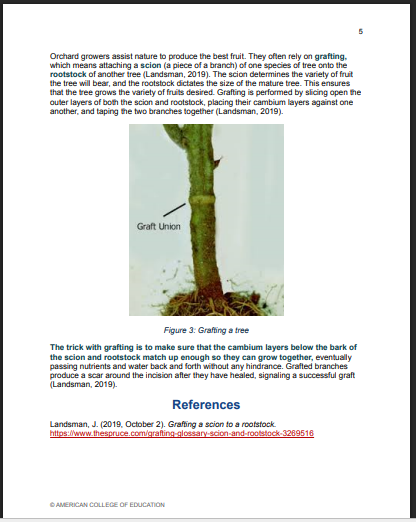
Several images lacked alt text or contained vague descriptions, making visual content inaccessible to screen reader users. Descriptive alt text was added to all images to convey their content, context, and instructional purpose clearly. Image captions were also revised and labeled consistently using the format Figure #: Name of the Figure, improving clarity and document organization (King & Piotrowski, 2021; Huss, 2022). In addition, the original design lacked sufficient color contrast, compromising accessibility for individuals with visual impairments. Therefore, contrasting colors for enhanced accessibility, highlighting for emphasis, were added (WebAIM, 2021)
After completing revisions, an accessibility checker was run to identify and correct remaining issues related to headings, contrast, alt text, and document structure. This step reinforced compliance with ADA and digital accessibility standards (Koob et al., 2022).
Reflecting on this process, I gained a deeper understanding of how small design choices significantly affect learner access and engagement. Documenting revisions through Track Changes and accessibility tools made the improvement process transparent and intentional. Screenshots taken before and after revisions will accompany this post to visually demonstrate how thoughtful accessibility practices can transform a learning object into an inclusive educational resource.
This experience reinforced my commitment to embedding accessibility into all instructional materials. By proactively addressing accessibility, educators can ensure that digital content supports equitable learning opportunities and empowers all students to engage meaningfully with course materials.
Huss, J. A. (2022). A high school website is a school community’s communication center … but is it ADA compliant? School Community Journal, 32(1), 245–263. https://discovery.ebsco.com/linkprocessor/plink?id=aadedac0-f1f8-3547-a154-f8ef596cc271
King, C., & Piotrowski, C. (2021). Navigating the ADA accessibility requirements and legal pitfalls in online education. College Student Journal, 55(2), 127–134. https://discovery.ebsco.com/linkprocessor/plink?id=815ec932-2994-3708-bab0-88e3e7629d7e
Koob, R., Ibacache Oliva, K. S., Williamson, M., Lamont-Manfre, M., Hugen, A., & Dickerson, A. (2022). Tech tools in pandemic-transformed information literacy instruction: Pushing for digital accessibility. Information Technology and Libraries, 41(4), 1–32. https://doi.org/10.6017/ital.v41i4.15383
WebAIM. (2021, February 26). Microsoft Word – creating accessible documents. https://webaim.org/techniques/word/